
 Login
Login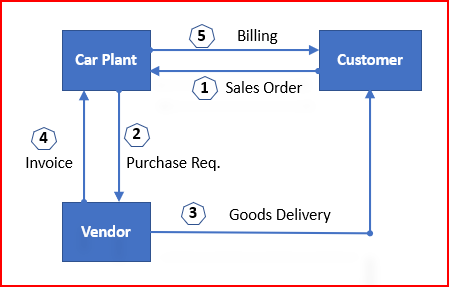


The Ultimate Guide to SAP Third Party Sales
Today’s business environment is fast-paced . So efficient order management is crucial for maintaining a competitive edge.
This comprehensive guide to Third Party Purchase and Sales Orders delves into the intricacies of third-party purchase and sales orders within the SAP system. This guide offers valuable insights and practical tips to streamline business operations with the help of SAP executed Third Party Purchase and Sales Orders.
Whether you’re a seasoned SAP expert or new to the SAP consultancy or a SAP business user, this guide will help you navigate the complexities of third-party order purchase and sales orders processing, optimize the workflows, and enhance overall business efficiency.
Let’s explore how SAP can transform third party purchase and sales orders management processes in 2024 and beyond.
1. Third-party Sales
In the third party Order processing , our business outsource the final product to a third party to sell it to customer.
Upon receiving third party order order from the customer, business passes it to the third party vendor who delivers the goods to the customer, and invoice to our business. Our business bills the customer for the goods supplied.

We will configure now third party sales order
Step 1 : Third Party Sales Order Configuration
First we will configure third party Sales order
Step 1.1 : Sales Order type Configuration
We will use our standard sales order type “YOR” for third party.
Start VA01
- Sales Organization : PA10
- Distribution Channel : PA
- Division : DC
- Customer : PA10CUS02
Create the Sales order and save
Please see below post for step by step details of sales order type configuration
Configure SAP S4 HANA Sales Documents in 10 Minutes
Please see below post for step by step Customer BP creation
How To Configure S4HANA BP and CVI In 7 Easy Steps – Creation of First BP Customer
For Pricing procedure configuration & determination, please check below post
The Ultimate SAP S4 HANA Sales Pricing Guide with FAQ
Step 2 : Sales Document Item category Configuration
We will use item category “TAS” for the third-party order processing, Please note the delivery relevance here configured as “Order based (F)” instead of “Delivery based (A)”. This is due to the final material is being sent directly to the customer from the third party warehouse/plant.
Mastering SAP Sales Item Categories: A Comprehensive Guide-Item Category for 3rd Party sales “TAS”
Item category is determined as “TAS”
Step 2.3 : Sales Document Item category Determination
For out third party sales processing, Item category “TAS” will be determined based on the Item category group “BANS” from the material master & std order type “YOR”
Check the below post for detail
Mastering SAP Sales Item Categories: A Comprehensive Guide – “TAS” Determination
Step 3: Schedule Line Configuration & Determination
for the third party , schedule line will be determined as “CS”
Due to the properties of schedule line determined “CS”, as soon as sales order is saved system will generate a purchase requisition
Please check the below post for schedule line category “CS” configuration & Determination
SAP Schedule Line Categories Explained: Everything You Need to Know – Third Party Sales “CS”
Step 4: Conversion of 3rd Party PR to PO
Finalize the source and convert the PR to PO manually or through automatic conversion
Display the third party PO through ME23N
During creation of purchase order system has automatically copied the delivery orders from the corresponding sales order to the purchase order
Please note the below points
4.1 Some Characteristics of third party SO & PO
- Purchase order number is available in the Sales order document flow.
- All changes made in the PO automatically reflects in the sales order, but the sales order changes will not reflect in the purchase order.
4.2 Characteristics of Item Category “S”
For the third party sales Item category “S”/”5” is used. Item category “S” ensures a dummy MIGO without any stock update.
4.3 Characteristics of Account Assignment Category “X”
Account Assignment Category controls if inventory accounting
document to generate or not while doing MIGO and PGI
Step 5: Goods Receipt
Since material is supplied directly to customer by supplier, when vendor supplies the material to customer, the customer confirms that the material is received & we post the material Goods Receipt
Please note :
- The material is posted to Cost of Goods Sold account.
- The warehouse stock is not updated
- The order value is posted to a GR/IR to verify invoice.
- The goods receipt can be traced in the purchase order history
5.1 Goods Receipt Material Document
5.2 Goods Receipt Accounting Document
Step 6: Invoice Receipt
When the incoming invoice is posted following are updated
- Purchase order history
- G/L accounts
- The vendor account in subledger accounting along with liabilities account.
Please see the post below for invoicing details & accounting document generated
How to Configure Logistics Invoice Verification in SAP S4 HANA – Invoicing for Third Party Sales
Step 7: Billing Third Party Orders
Billing in third party order depends a lot on the setting of the “Billing Relevance” field.
If relevance for billing indicator for the item category has been set to B (relevant for order-related billing on the basis of the order quantity) in Customizing, the system includes the order in the billing due list immediately.
If the indicator has been set to F (relevant to order-related billing on the basis of the invoice quantity), the system does not include the order in the billing due list until an invoice from the vendor has been received and processed by the purchasing department.
We have configured item category TAS (third-party order processing) has been given billing-relevance indicator F.
Please see the below post for Item Category “TAS” configuration
Mastering SAP Sales Item Categories: A Comprehensive Guide – Item Category for 3rd Party sales “TAS”
7.1 Sales Order to Billing Document Copy Control Setting for third party
In the configuration of copying control for billing at item level, we can control whether the invoice receipt quantity or the goods received quantity is relevant for billing.
The setting in the copy control for the third-party item category from sales document to billing document specifies that the quantity from the invoice receipt is transferred to the billing document instead of the order quantity (billing quantity indicator in copy control is F)
Please see below post for the configuration in details for third party sales processing copy control
Master SAP SD Billing Configuration – Copy Control from Sales Document to Billing Document
7.2 Posting Third Party Billing Document
Please check below post for the detail of third party sales billing document posting
Master SAP SD Billing Configuration – Billing for Third Party Sales Scenario
The post The Ultimate Guide to SAP Third Party Sales appeared first on Ultimate SAP Guides | S4 HANA Logistics Modules.
