Consecutive Condition Types that have Same Values are not Displayed in the Subtotal in the Output


SAP Sales and Distribution (SD) is an important module in SAP S4/HANA ERP that facilitates all transactional processes involved in the selling, shipping, and billing of products and services. SAP SD in S4/HANA Transaction Codes (TCodes) streamlines the execution of various tasks within the sales and distribution workflow, including order processing, material shipping, billing documentation, and sales reports.
We have compiled a concise list of SAP SD TCodes tailored to improve sales management efficiency. Utilize the Ctrl+F function to swiftly locate the specific TCodes and their descriptions, optimizing your sales processes and operational workflow.
| Transaction Codes | Descriptions | What it does |
| COGI | Automatic Goods Movements: Error Handling | Correcting errors generated from automatic good movements |
| DGP1 | Create Dangerous Goods Master | Creating dangerous goods master, as an extension of thematerial master |
| DGP2 | Change Dangerous Goods Master | Updating a dangerous goods master previously generated using Tcode DGP1 |
| DGP3 | Display Dangerous Goods Master | Viewing a dangerous goods master previously generated using TCode DGP1 |
| DGR1 | Dangerous Goods Master: Display with Descriptions | Viewing a list of dangerous goods master data from DGTMD – the Dangerous Goods Master Data Table |
| DP91 | Resource-Related Billing Request | Creating a special type of billing based on consumed resources |
| DP93 | Resource-Related Billing Request between Company Codes Sales and Distribution | Creating intercompany billing |
| DP96 | Collective Processing Resource- Related Billing Request | Processing multiple billing requests |
| MCTA | Customer Analysis: Selection | Analyzing customer sales data |
| MCTC | Material Analysis (SIS): Selection | Analyzing material sales data |
| MCTE | Sales Organization Analysis: Selection | Analyzing sales organization data |
| TK11 | Create Condition Records Shipment Costs | Maintaining shipment cost records |
| TK12 | Change Condition Records Shipment Costs | Modifying shipment cost records |
| TK13 | Display Condition Records Shipment Costs | Displaying shipment cost records |
| OV50 | Customer Master Data Comparison | Comparing customer master data |
| OV51 | Display Changes to Customers | Displaying changes to customer data |
| V.01 | Incomplete SD Documents | Listing incomplete sales documents |
| V.02 | Incomplete SD Documents (Incomplete Orders) | Selecting incomplete sales orders |
| V.03 | Incomplete SD Documents (Sales Inquiry) | Selecting incomplete sales inquiries |
| V.04 | Incomplete SD Documents (Sales Quotation) | Selecting incomplete sales quotes |
| V.14 | Sales Orders/Contracts Blocked for Delivery | Reporting blocked sales orders |
| V.15 | Backorders | Processing and confirming backorders |
| V.21 | Log of Collective Run | Reviewing billing collective logs |
| V.23 | Release Sales Orders for Billing | Releasing orders for billing |
| V_17 | Create Condition Record Using Index | Creates new condition records utilizing an index for faster updates |
| V_NL | Create Net Price List | Generates a net price list from existing pricing conditions |
| V_R2 | Rescheduling of Sales and Stock Transfer Documents: Evaluation | Evaluates rescheduled sales and stock transfer documents for priority |
| V_UC | Selection of Incomplete SD Documents | Lists all sales documents flagged as incomplete based on specified criteria |
| V_V2 | Rescheduling of Sales and Stock Transfer Documents: By Material | Adjusts scheduling of sales and stock documents based on material availability |
| V/I5 | Change Condition Record Using Index | Modifies existing condition records using an index for streamlined updates |
| V/I6 | Display Condition Record Using Index | Shows condition records through an indexed search for quick access |
| V/LD | Execute Pricing Report | Displays pricing information through a predefined report structure |
| VA01 | Create Sales Order | Initiates a new sales order to establish a selling agreement |
| VA02 | Change Sales Order | Modifies existing sales orders, such as item addition or deletion. |
| VA03 | Display Sales Order | Shows details of a specific sales order created earlier |
| VA05 | List of Sales Orders | Lists sales orders based on material, partner, or date criteria |
| VA05N | List of Sales Orders | Provides detailed listing of sales orders by various selection criteria |
| VA07 | Selection: Comparison of Orders with Purchase Requisitions and Purchase Orders | Reports discrepancies between sales and purchase quantities in third-party sales |
| VA08 | Adjustment Sales-Purchasing (Selection Using Organizational Data) | Reports mismatches between sales order and purchase order quantities in third-party sales |
| VA11 | Create Inquiry | Records customer inquiries with potential pricing and scheduling |
| VA12 | Change Inquiry | Alters details of an existing customer inquiry |
| VA13 | Display Inquiry | Displays details of a specific customer inquiry |
| VA14L | Sales Documents Blocked for Delivery | Reviews sales documents blocked from delivery, often due to credit issues |
| VA15 | List of Inquiries | Lists sales inquiries based on specific criteria. |
| VA21 | Create Quotation | Creates a legally binding sales offer with pricing and scheduling |
| VA22 | Change Quotation | Modifies an existing sales quotation |
| VA23 | Display Quotation | Shows details of a specific sales quotation |
| VA25 | List of Quotations | Lists sales quotations based on various criteria |
| VA25N | List of Quotations | Provides detailed listing of quotations by multiple selection criteria |
| VA26 | List of Quotations (Follow-up Actions) | Displays open quotations up to a certain valid date |
| VA31 | Create Scheduling Agreement | Sets up a delivery agreement with precise dates and quantities |
| VA32 | Change Scheduling Agreement | Alters an existing scheduling agreement as per new requirements |
| VA33 | Display Scheduling Agreement | Views details of a specific scheduling agreement |
| VA35 | List of Scheduling Agreements | Shows all scheduling agreements based on selected criteria |
| VA41 | Create Contract | Creates various types of sales contracts |
| VA42 | Change Contract | Modifies existing contracts with change log |
| VA42W | Change Contract | Alters contracts with workflow approval |
| VA43 | Change Contract | Shows details of a specific contract |
| VA44 | Actual Overhead: Calculation: Sales Order | Calculates overhead costs for sales orders |
| VA45 | List of Contracts | Lists contracts based on specific criteria |
| VA45N | List of Contracts | Provides detailed listing of contracts |
| VA46 | List of Contracts (Follow-up Actions) | Displays open contracts up to a valid date |
| VA51 | Create Item Proposal | Creates a list of materials for sales orders |
| VA52 | Change Item Proposal | Modifies an existing item proposal |
| VA53 | Display Item Proposal | Shows details of a specific item proposal |
| VA55 | List of Item Proposals | Lists item proposals based on materials |
| VA88 | Actual Settlement: Sales Orders | Settles costs and revenues for sales orders |
| VACF | Fiscal Year Close: Carry Forward Commitment | Carries forward open sales order commitments |
| VB01 | Create Listing/Exclusion | Controls materials sold to specific customers |
| VB02 | Change Listing/Exclusion | Alters existing material listing/exclusions |
| VB03 | Display Listing/Exclusion | Displays material listing or exclusion details |
| VB11 | Create Material Determination | Sets up automatic material substitution conditions |
| VB12 | Change Material Determination | Modifies existing material substitution conditions |
| VB13 | Display Material Determination | Shows material substitution condition details |
| VB21 | Create Sales Deal | Establishes master data for a specific sales deal |
| VB22 | Change Sales Deal | Alters details of an existing sales deal |
| VB23 | Display Sales Deal | Views details of a specific sales deal |
| VB25 | List of Sales Deals | Lists sales deals based on multiple selection criteria |
| VB31 | Create Promotion | Initiates a new marketing promotion |
| VB32 | Change Promotion | Updates details of an existing promotion |
| VB33 | Display Promotion | Displays specific promotion details |
| VB35 | Promotions List | Lists multiple promotions based on selection criteria |
| VB41 | Create Cross-Selling | Establishes cross-selling links between materials |
| VB42 | Change Cross-Selling | Modifies existing cross-selling material data |
| VB43 | Display Cross-Selling | Shows cross-selling material determination data |
| VBN1 | Create Free Goods Determination | Sets up conditions for automatic free goods allocation |
| VBN2 | Change Free Goods Determination | Adjusts existing free goods condition records |
| VBN3 | Display Free Goods Determination | Displays details of free goods condition records |
| VBO1 | Create Rebate Agreement | Creates retroactive rebate agreements with customers |
| VBO2 | Change Rebate Agreement | Modifies existing rebate agreements, including terms and amounts |
| VBO3 | Display Rebate Agreement | Displays details of existing rebate agreements |
| VBOF | Update Billing Documents | Updates billing documents for changed rebate conditions |
| VC/2 | Sales Summary | Prepares sales activity reports with customizable views |
| VC01N | Create Sales Activity | Records various sales activities with customers |
| VCC1 | Payment Cards: Worklist | Lists sales orders/deliveries involving payment cards |
| VD01 | Customer Create (Sales) | Creates new customer master record in sales view |
| VD02 | Customer Change (Sales) | Changes existing customer master records in sales view |
| VD03 | Customer Display (Sales) | Displays customer master records at sales level |
| VD04 | Customer Account Changes | Reports changes to customer master records by area |
| VD05 | Customer Block/Unblock | Blocks or unblocks customers from transactions |
| VD06 | Customer Flag for Deletion | Flags a customer master for deletion in all areas |
| VD51 | Create Customer-Material Info Record | Stores specific data for customer-material relations |
| VD52 | Selection of Customer-Material Info Records (Change) | Changes existing customer-material info records |
| VD53 | Selection of Customer-Material Info Records (Display) | Displays existing customer-material info records |
| VD59 | List Customer-Material Info | Lists all customer-material info records by criteria |
| VDH1N | Edit Customer Hierarchy | Creates or modifies customer organization hierarchy |
| VDH2 | Display Customer Hierarchy | Displays a customer organization hierarchy |
| VF01 | Create Billing Document | Processes an individual billing document |
| VF02 | Change Billing Document | Modifies an existing billing document |
| VF03 | Display Billing Document | Shows a previously processed billing document |
| VF04 | Maintain Billing Due List | Processes multiple billing documents simultaneously |
| VF05 | List of Billing Documents | Lists billing documents by material or business partner |
| VF05N | List of Billing Documents | Lists billing documents by various customer and billing criteria |
| VF11 | Cancel Billing Document | Cancels an incorrectly posted billing document |
| VF21 | Create Invoice List | Creates a list of invoices for a central payer |
| VF22 | Change Invoice List | Modifies an existing invoice list |
| VF23 | Display Invoice List | Displays a previously created invoice list |
| VF25 | List of Invoice Lists | Lists invoice lists by business partner payer |
| VF26 | Cancel Invoice List | Cancels an entire invoice list, enabling re-posting |
| VF31 | Output from Billing | Processes separate billing document outputs |
| VF43 | Posting Documents for Revenues | Reports on revenue recognition postings by sales order |
| VF44 | Edit Revenue List | Initializes separate revenue recognition |
| VF45 | Revenue Report | Reports on revenue recognition for multiple orders |
| VF46 | Maintain Cancellation List | Cancels incorrect revenue recognition postings |
| VF47 | Revenue Recognition; Inconsistency Check in Revenue Table | Analyzes and checks for data inconsistencies in revenue recognition tables |
| VF48 | Compare Report | Compares FI and SD balances on accrual accounts |
| VFRB | Retro-Billing | Processes retroactive billing due to new pricing agreements |
| VFX3 | Release Billing Documents for Accounting | Releases billing documents for financial posting |
| VG01 | Create Group | Groups delivery documents for collective processing |
| VG02 | Change Group | Modifies an existing delivery group |
| VG03 | Display Group | Displays details of a delivery group |
| VI01 | Create Shipment Costs | Generates individual shipment cost documents |
| VI02 | Change Shipment Costs | Updates individual shipment cost documents |
| VI03 | Display Shipment Costs | Shows individual shipment cost document details |
| VI04 | Shipment List: Create Shipment Costs | Creates multiple shipment cost documents |
| VI05 | List Shipment Costs: Change Worklist | Modifies shipment cost documents via a worklist |
| VI07 | List Shipment Costs: Change Worklist in Background | Changes shipment cost documents in background processing |
| VI12 | List Shipment Costs: Settlement | Settles incomplete shipment cost documents |
| VI16 | Logs in the Application Log | Reviews logs for shipment cost document changes |
| VK11 | Create Condition Records | Maintains pricing condition records for sales |
| VK12 | Change Condition Records | Modifies pricing condition records |
| VK13 | Display Condition Records | Displays details of a pricing condition record |
| VK14 | Create Condition Records with Reference | Creates pricing records referencing existing ones |
| VKM1 | Blocked SD Documents | Reviews credit-blocked sales documents |
| VKM2 | Released SD Documents | Displays sales documents released from credit block |
| VKM3 | Sales Document | Reviews credit-blocked sales orders specifically |
| VKM4 | SD Documents | Reviews both blocked and released sales documents |
| VKM5 | Deliveries | Reviews credit-blocked deliveries specifically |
| VL01N | Create Outbound Delivery with Order Reference | Creates delivery document from a sales document |
| VL01NO | Create Outbound Delivery without Order Reference | Creates delivery document without sales order reference |
| VL02N | Change Outbound Delivery | Modifies an outbound delivery document |
| VL03N | Display Outbound Delivery | Shows details of an outbound delivery document |
| VL06 | Delivery Monitor | Central transaction for monitoring deliveries |
| VL06C | Outbound Deliveries for Confirmation | Processes confirmation-needed delivery documents |
| VL06D | Outbound Deliveries for Distribution | Manages delivery documents for decentralized WMS |
| VL06F | General Delivery List – Outbound Deliveries | Lists outbound delivery documents with various filters |
| VL06G | Outbound Deliveries for Goods Issue | Processes goods issue for outbound deliveries |
| VL06I | Inbound Delivery Monitor | Central transaction for monitoring inbound deliveries |
| VL06IC | Inbound Deliveries for Confirmation | Processes confirmation for inbound deliveries |
| VL06ID | Inbound Deliveries for Distribution | Manages inbound deliveries for decentralized WMS |
| VL06IF | List of Inbound Deliveries | Lists inbound delivery documents with various filters |
| VL06IG | Inbound Deliveries for Goods Receipt | Processes goods receipt for inbound deliveries |
| VL06IP | Inbound Deliveries for Putaway | Manages inbound deliveries for warehouse putaway |
| VL06L | Outbound Deliveries for Loading | Lists deliveries ready for loading |
| VL06O | Outbound Delivery Monitor | Monitors and processes outbound delivery documents |
| VL06P | Outbound Deliveries for Picking | Executes the picking process for outbound deliveries |
| VL06T | Outbound Deliveries for Transportation Planning | Displays deliveries ready for transportation planning |
| VL06U | Unchecked Outbound Deliveries | Lists unchecked outbound deliveries |
| VL08 | Report Results of Pick Order | Reports picked quantities for delivery orders |
| VL09 | Reverse Goods Movement | Reverses incorrect goods movements like goods issues |
| VL10 | Sales and Purchase Orders, Fast Display | Creates multiple delivery documents for sales/purchase orders |
| VL10A | Sales Orders, Fast Display | Creates multiple delivery documents for sales orders |
| VL10B | Purchase Orders, Fast Display | Creates multiple delivery documents for purchase orders |
| VL10H | Sales Order and Purchase Order Items | Creates delivery documents at the sales or purchase order line item level |
| VL10I | Sales and Purch. Order Item Sched. Lines | Creates delivery documents from schedule line agreements |
| VL21 | Create Background Jobs for Goods Issue Posting | Posts goods issues for deliveries in background mode |
| VL22 | Display Change Documents of Delivery | Shows changes made to delivery documents |
| VL31N | Create Inbound Delivery | Creates a document for incoming deliveries from vendors |
| VL32N | Change Inbound Delivery | Modifies details of an existing inbound delivery |
| VL33N | Display Inbound Delivery | Displays an inbound delivery document’s details |
| VL35 | Create Picking Waves According to Delivery Compare Times | Assigns deliveries to picking waves based on order time |
| VL35_ST | Create Pick. Waves Acc. to Shipments | Automates wave picks creation based on shipment criteria |
| VL36 | Change Wave Picks | Alters existing picking wave assignments |
| VL37 | Wave Pick Monitor | Monitors the status of assigned picking waves |
| VL41 | Create Rough Goods Receipt | Initiates a preliminary step in the goods receiving process |
| VL64 | Generation of Inbound Deliveries | Automatically generates inbound deliveries from purchase schedules |
| VL65 | Inbound Delivery Purge Report | Purges old, irrelevant inbound deliveries |
| VL66 | Delete Inbound Delivery | Removes an inbound delivery document from the system |
| VLSP | Subsequent Outbound-Delivery Split | Splits an existing delivery into multiple ones |
| VM01 | Create Hazardous Material | Creates hazardous material master records |
| VM02 | Change Hazardous Material | Modifies hazardous material master records |
| VM03 | Display Hazardous Material | Displays hazardous material master records |
| VRRE | Create Returns Delivery for Repair Order | Generates returns delivery document for repair orders |
| VS01 | Create Scale | Creates scales for shipment cost calculations |
| VS02 | Change Scale | Modifies rates and scales for shipment costs |
| VS03 | Display Scale | Displays scales used in shipment cost calculations |
| VS04 | Create Scale with Reference | Creates new scale records referencing existing ones |
| VS06 | List Scales | Reports on scales and rates for shipment costs |
| VT01N | Create Shipment | Creates individual shipment documents |
| VT02N | Change Shipment | Modifies existing shipment documents |
| VT03N | Display Shipment | Displays details of a shipment document |
| VT04 | Create Shipments in Collective Proc. | Creates multiple shipment documents automatically |
| VT05 | Logs in the Application Log | Displays logs from collective shipment creation |
| VT06 | Shipment List: Collective Change Shipment | Enables mass changes to multiple shipment documents |
| VT11 | Shipment List: Planning | Reports on shipments needing planning or scheduling |
| VT12 | Shipment List: Shipment Completion | Reports on completion status of shipments |
| VT16 | Shipment List: Check-in | Reports on expected shipments for check-in |
| VT20 | Overall Shipment Status Monitor | Monitors transportation execution and workload |
| VT22 | Selection Screen: Change Document Shipment | Lists changes to shipment documents |
| VT32 | Selection Criteria for Forwarding Agent | Reports on tendering status for transportation |
| VT70 | Messages for Shipments | Prints various shipping-related documents |
| VV21 | Create Output – Condition Records: Shipping | Sets conditions for shipping document outputs |
| VV22 | Change Output – Condition Records: Shipping | Modifies output conditions for shipping documents |
| VV31 | Create Output – Condition Records: Billing | Sets conditions for billing document outputs |
| VV32 | Change Output – Condition Records: Billing | Modifies output conditions for billing documents |

Enhance your SAP SD proficiency by subscribing to the Spend Wizard blog. This resource provides the latest insights and updates on SAP S4/HANA and Sales and Distribution solutions, helping you stay informed and ahead in your field.
The post SAP S4/HANA SD Transaction Codes (Comprehensive List with usage) appeared first on Spend Wizard.
SAP Third Party Sales with Individual Purchase Order is a powerful functionality designed to streamline the sales and procurement process for the businesses working with external suppliers.
This post will guide you through the key features, benefits, and step-by-step execution of SAP Third Party Sales with Individual Purchase Order.
--> Third-party with Individual Purchase Order is like Third Party Sales but with a difference. The difference is vendor sends the Finished materials to the Business instead of directly sending to the customer. After that our business sends the FG to the customer and send the invoice to the customer.
In this scenario, vendor does not send the invoice immediately with delivering the goods to customer. We ask vendor to send shipping notification after delivering the goods to customer. When we receive the shipping notification then we do MIGO and basing on MIGO quantity we raise invoice to Customer. Without vendor invoice we cannot raise billing to our customer.
Below is the process flow for SAP Third Party Sales with Individual Purchase Order

Lets configure & test SAP Third Party Sales Process with Individual Purchase Order
First we will configure Sales order & related components
We will use our standard sales order type “YOR” for third party sales with Individual Purchase Order
Start VA01
Create the Sales order and save

Please see below post for step by step details of sales order type configuration
Configure SAP S4 HANA Sales Documents in 10 Minutes
Please see below post for step by step Customer BP creation
How To Configure S4HANA BP and CVI In 7 Easy Steps – Creation of First BP Customer
For Pricing procedure configuration & determination, please check below post
The Ultimate SAP S4 HANA Sales Pricing Guide with FAQ
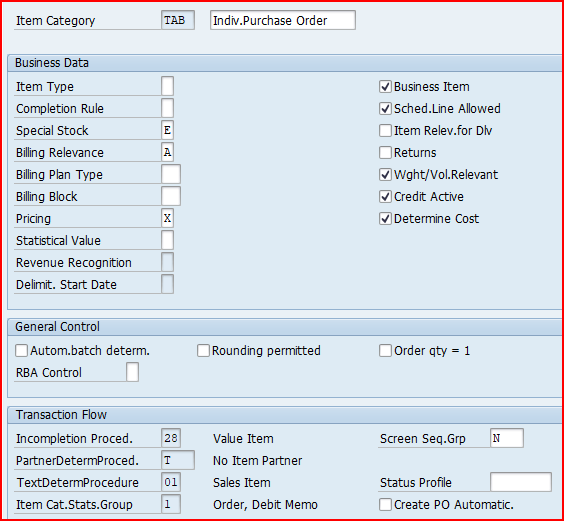
We will use item category “TAB” for the processing of third Party Sales with Individual Purchase Order, Please note the Billing relevance here configured as Delivery based (A)” instead of “Order based (F)” in third party sales. This is due to the final material is being sent back to the plant instead of directly to the customer from the third party warehouse/plant.
Please see below post for the Item category configuration details
Mastering SAP Sales Item Categories: A Comprehensive Guide-Third-party with individual Purchase Orders “TAB”
Item category is determined as “TAB”

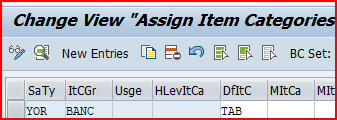
For out third party sales processing, Item category “TAB” will be determined based on the Item category group “BANC” from the material master & std order type “YOR”
Check the below post for detail
Mastering SAP Sales Item Categories: A Comprehensive Guide – “TAB” Determination
for the third party , schedule line will be determined as “CB”
Due to the properties of schedule line determined “CB”, as soon as sales order is saved system will generate a purchase requisition

Please check the below post for schedule line category “CB” configuration & Determination
SAP Schedule Line Categories Explained: Everything You Need to Know – Third Party with Individual Purchase Orders “CB”
Finalize the source and convert the PR to PO manually or through automatic conversion
Display the third party PO through ME23N

Account Assignment Category controls if inventory accounting
document to generate or not while doing MIGO and PGI

Because of configuration of Account Assignment Category “H”, system will create special stock “E”
In this scenario GR will be done as normal purchase order. The only difference is , it will generate special stock of type “E”
Let’s do the GR of 1 qty

Accounting document will be generated


Please note :

When the incoming invoice is posted following are updated
Please see the post below for invoicing details & accounting document generated
Since in this scenario we deliver from our plant so we will create a Outbound Delivery based on the customer sales order
We got the below error

Please see the below post for detail configuration of copy control from sales document to delivery document
Copy Control for Third Party Sales with individual PO – Configure SAP S4 HANA Sales Documents in 10 Minutes
We completed the above configuration and successfully created outbound delivery

Outbound Delivery Picking, Packing & Goods Issue completed.
Please note that stock type is “E” in outbound delivery as expected

Below accounting document is created at PGI

Billing in third party with individual PO order depends a lot on the setting of the “Billing Relevance” field.
If relevance for billing indicator for the item category has been set to B (relevant for order-related billing on the basis of the order quantity) in Customizing, the system includes the order in the billing due list immediately.
If the indicator has been set to F (relevant to order-related billing on the basis of the invoice quantity), the system does not include the order in the billing due list until an invoice from the vendor has been received and processed by the purchasing department.
for this scenario, we have configured item category TAB (Indiv.Purchase Order) which is given billing-relevance indicator “A”.
--> Value "A" in the billing relevance field of sales order item category indicates that the billing document is created based on the delivery. This means that the invoice is generated after the goods have been delivered to the customer.
Please see the below post for Item Category “TAB” configuration
In the configuration of copying control for billing at item level, we can control whether the invoice receipt quantity or the goods received quantity is relevant for billing.
Please see below post for the configuration in details for third party sales processing copy control
Master SAP SD Billing Configuration – Scenario 2 : Third Party Sales with Individual PO
Please check below post for the detail of third party sales billing document posting
Master SAP SD Billing Configuration – Billing for Third Party Sales with Individual PO Scenario
Image by vectorjuice on Freepik
The post An Ultimate Guide to SAP Third Party Sales with Individual Purchase Order appeared first on Ultimate SAP Guides | S4 HANA Logistics Modules.
Today’s business environment is fast-paced . So efficient order management is crucial for maintaining a competitive edge.
This comprehensive guide to Third Party Purchase and Sales Orders delves into the intricacies of third-party purchase and sales orders within the SAP system. This guide offers valuable insights and practical tips to streamline business operations with the help of SAP executed Third Party Purchase and Sales Orders.
Whether you’re a seasoned SAP expert or new to the SAP consultancy or a SAP business user, this guide will help you navigate the complexities of third-party order purchase and sales orders processing, optimize the workflows, and enhance overall business efficiency.
Let’s explore how SAP can transform third party purchase and sales orders management processes in 2024 and beyond.
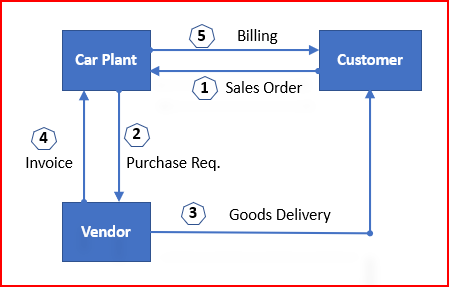
In the third party Order processing , our business outsource the final product to a third party to sell it to customer.
Upon receiving third party order order from the customer, business passes it to the third party vendor who delivers the goods to the customer, and invoice to our business. Our business bills the customer for the goods supplied.

We will configure now third party sales order
First we will configure third party Sales order
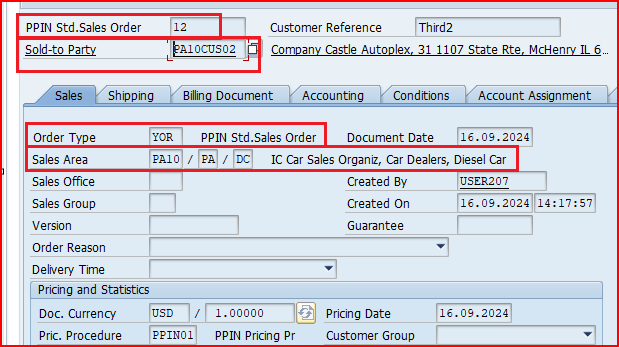
We will use our standard sales order type “YOR” for third party.
Start VA01
Create the Sales order and save

Please see below post for step by step details of sales order type configuration
Configure SAP S4 HANA Sales Documents in 10 Minutes
Please see below post for step by step Customer BP creation
How To Configure S4HANA BP and CVI In 7 Easy Steps – Creation of First BP Customer
For Pricing procedure configuration & determination, please check below post
The Ultimate SAP S4 HANA Sales Pricing Guide with FAQ
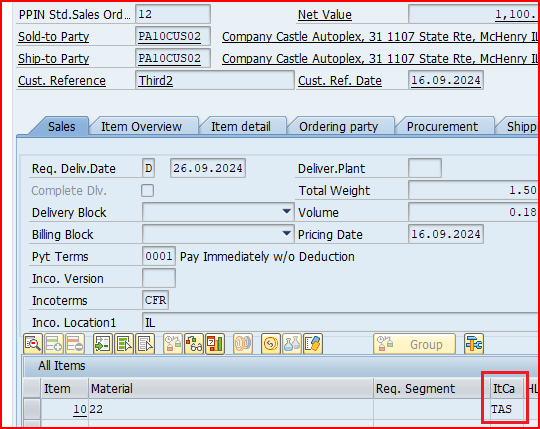
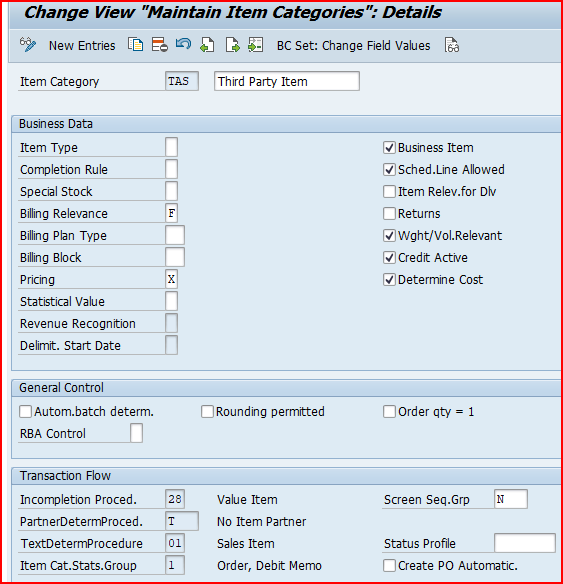
We will use item category “TAS” for the third-party order processing, Please note the delivery relevance here configured as “Order based (F)” instead of “Delivery based (A)”. This is due to the final material is being sent directly to the customer from the third party warehouse/plant.
Mastering SAP Sales Item Categories: A Comprehensive Guide-Item Category for 3rd Party sales “TAS”
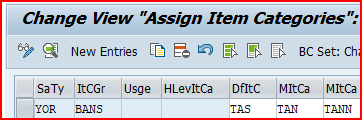
Item category is determined as “TAS”

For out third party sales processing, Item category “TAS” will be determined based on the Item category group “BANS” from the material master & std order type “YOR”
Check the below post for detail
Mastering SAP Sales Item Categories: A Comprehensive Guide – “TAS” Determination
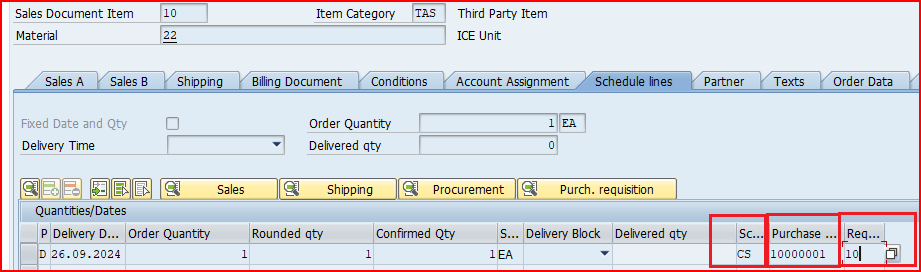
for the third party , schedule line will be determined as “CS”
Due to the properties of schedule line determined “CS”, as soon as sales order is saved system will generate a purchase requisition

Please check the below post for schedule line category “CS” configuration & Determination
SAP Schedule Line Categories Explained: Everything You Need to Know – Third Party Sales “CS”
Finalize the source and convert the PR to PO manually or through automatic conversion
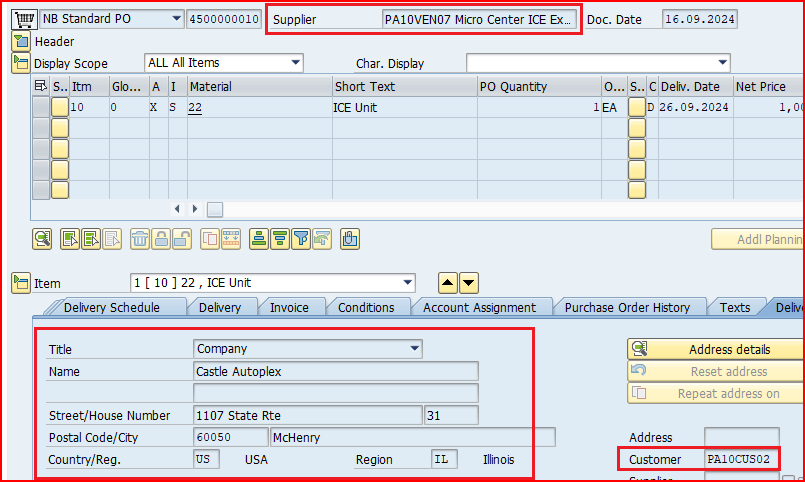
Display the third party PO through ME23N

During creation of purchase order system has automatically copied the delivery orders from the corresponding sales order to the purchase order

Please note the below points
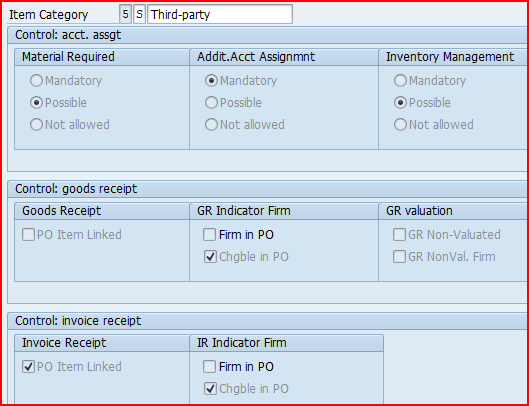
For the third party sales Item category “S”/”5” is used. Item category “S” ensures a dummy MIGO without any stock update.

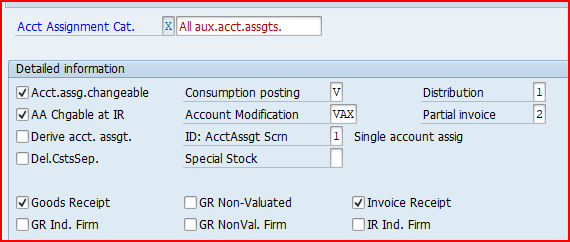
Account Assignment Category controls if inventory accounting
document to generate or not while doing MIGO and PGI

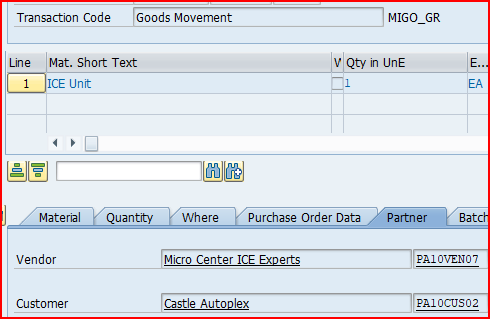
Since material is supplied directly to customer by supplier, when vendor supplies the material to customer, the customer confirms that the material is received & we post the material Goods Receipt
Please note :


When the incoming invoice is posted following are updated
Please see the post below for invoicing details & accounting document generated
How to Configure Logistics Invoice Verification in SAP S4 HANA – Invoicing for Third Party Sales
Billing in third party order depends a lot on the setting of the “Billing Relevance” field.
If relevance for billing indicator for the item category has been set to B (relevant for order-related billing on the basis of the order quantity) in Customizing, the system includes the order in the billing due list immediately.
If the indicator has been set to F (relevant to order-related billing on the basis of the invoice quantity), the system does not include the order in the billing due list until an invoice from the vendor has been received and processed by the purchasing department.
We have configured item category TAS (third-party order processing) has been given billing-relevance indicator F.
Please see the below post for Item Category “TAS” configuration
Mastering SAP Sales Item Categories: A Comprehensive Guide – Item Category for 3rd Party sales “TAS”
In the configuration of copying control for billing at item level, we can control whether the invoice receipt quantity or the goods received quantity is relevant for billing.
The setting in the copy control for the third-party item category from sales document to billing document specifies that the quantity from the invoice receipt is transferred to the billing document instead of the order quantity (billing quantity indicator in copy control is F)
Please see below post for the configuration in details for third party sales processing copy control
Master SAP SD Billing Configuration – Copy Control from Sales Document to Billing Document
Please check below post for the detail of third party sales billing document posting
Master SAP SD Billing Configuration – Billing for Third Party Sales Scenario
The post The Ultimate Guide to SAP Third Party Sales appeared first on Ultimate SAP Guides | S4 HANA Logistics Modules.
SAP Sales Item Categories are a critical components within the SAP Sales and Distribution (SD) module which defines how different materials are processed in various sales documents.
Sales Item categories determine the behavior of items, ensuring that each material is handled appropriately based on its specific characteristics and the business requirements in the sales orders, quotations, and deliveries,
item categories are configured to control pricing, delivery schedules & billing. Efficient configuration leads to enhanced efficiency and accuracy in sales processes.
--> Item Category is used in sales order as well as in delivery.
--> If we create or copy a new item category for delivery, we must also define a delivery item category for the sales order with the same name. The system automatically transfers the item category that was found for the sales document item into the delivery item.
The sales item category is one of the most important fields in the SAP sales order. It controls the sales document flow and also impacts the schedule line category
Item Category realize different business processes for each item in the sales document.
Item Category decided below behavior of the materials in the sales documents. Let’s review all the fields controlled by Item category one by one

We will configure below Item Categories for our car business sales documents.
To configure the item category of sales document , follow the below path

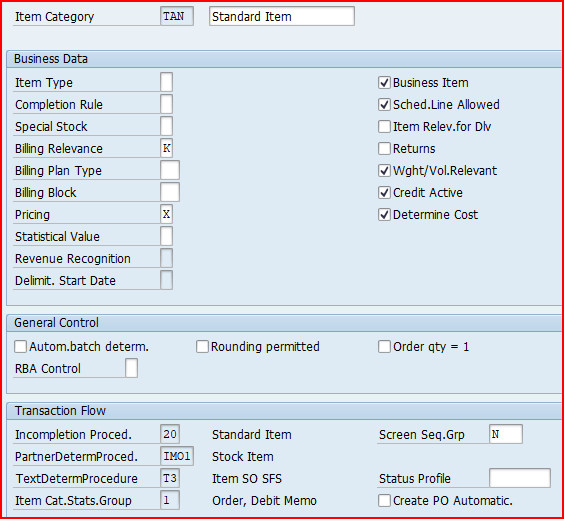
We will use SAP standard Item Category “TAN” for the standard sales order.

A third-party subcontracting order involves outsourcing specific tasks or services to an external vendor who directly delivers the required goods or services to the end customer.
Third party subcontracting process streamlines operations, reduces costs, and enhances efficiency by leveraging the expertise and resources of specialized subcontractors
Please check the below post for 3rd party subcontracting process configuration & testing in detail
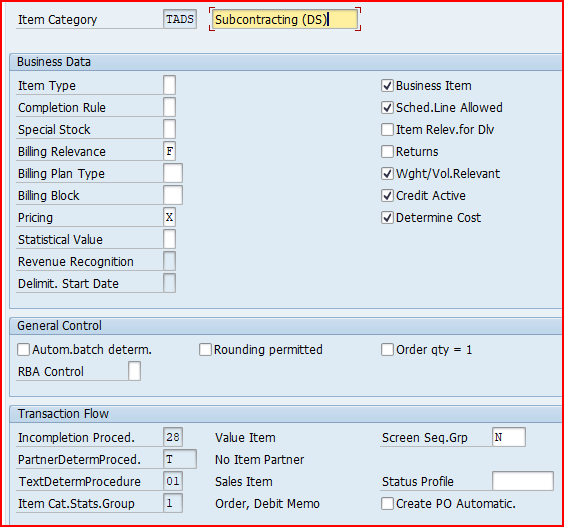
Item category “TADS” is used for 3rd party subcontracting process.
Lets see the configuration of TADS

Please note that billing relevance is “F-Order-related billing doc. – status according to invoice qty” instead of “A-Delivery-related billing document”
In the third party Order process , final product is outsourced to a third party to sell it to customer.
There are various scenarios for the third party. Lets see each third party scenario item category requirements
For the third-party order processing, the item category is TAS.
Please note that billing relevance would be configured as “F”. It is because of Order related invoice will be created here. The delivery will not be done from our premises. It will be sent straight from the third party to the customer.

If relevance for billing indicator for the item category is “B” (relevant for order-related billing on the basis of the order quantity), the system includes the order in the billing due list immediately. Hence the third-party order is considered to be completely billed only when the vendor invoiced quantity equals the order quantity of the sales order item.
If relevance for billing indicator set to F (relevant to order-related billing on the basis of the invoice quantity), the system does not include the order in the billing due list until an vendor invoice is received and processed. Each time a vendor invoice is received, a customer invoice is created for the quantity in the vendor invoice and the order is considered to be fully invoiced until the next vendor invoice is received.
So if billing-relevance indicator F is activated for item categories, billing can refer to the goods receipt quantity instead of the incoming invoice quantity.
For the third-party with individual Purchase Orders processing, the item category is TAB.
Please note that here billing relevance would be A as the finish material will be received first in our stock/warehouse. from our warehouse it will be delivered to the customer.
Value “A” in the billing relevance item category of sales order indicates that the billing document is created based on the delivery. This means that the invoice is generated after the goods have been delivered to the customer.

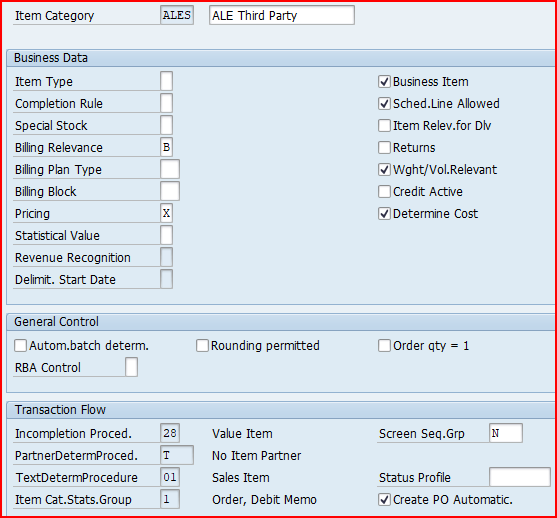
For the third-party with individual Purchase Orders processing, for the ALE process (automatic order creation) the item category is ALES.

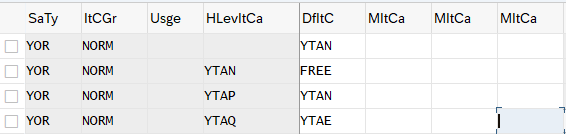
Item category group field of the material master is the main factor to determine the item category in the sales order. This indicator + Sales document type + usage of the item category + Item category of higher-level item
decides the item category in the sales order document.
Item category is determined as per below combination in sales documents


We have configured our item categories as below

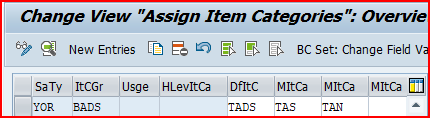
for third party subcontracting order we use Item category as “TADS” as described HERE

From the above configuration, Item category TADS will be determined automatically for sales order type YOR and item category group BADS (third-party subcontracting item)
Please note that Item category group “BADS” comes from the material master as explained in the below post
2 Minutes Guide to Create your First Material in S4 HANA – “Gen. item cat. grp” for Third Party Subcontracting
As we have seen HERE , there are three scenarios for third party process in SAP
Item Category “TAS” is determined as per below configuration

Please note that Item category group “BANS” comes from the material master as explained in the below post
2 Minutes Guide to Create your First Material in S4 HANA – “Gen. item cat. grp” for Third Party Sales
Please check the detail step by step end to end third party process in the below post
The Ultimate Guide to SAP Third Party Sales
Item Category “TAB” is determined as per below configuration

Please note that Item category group “BANC” comes from the material master as explained in the below post
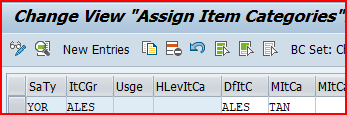
Item Category “ALES” is determined as per below configuration

Item categories are defined to have more control over individual materials in the deliveries. The item category is copied from an order item. A standard item in a standard order then becomes a standard item in the delivery. If a delivery is entered without reference to an order, the system proposes the item category depending on the delivery type and the item category group of the material.
Some Rules of Delivery Item Categories
--> When a sales order item is copied to a delivery, item category of the order item is copied to the delivery item. If order item or the schedule line assigned to order item is relevant for delivery a corresponding item category must be defined for the delivery.
--> Delivery item category key must be the same key as order item category. So we must define all delivery item categories as sales item categories in Sales and Distribution even for inbound delivery item category which is never found in sales documents. This is required for the system to create a copying relationship between the order and delivery document at the item level. For example DL/ELN to EL/ELN.
--> For all delivery item categories other than SD document category 7, a schedule line categories consisting of movement type must be determined in sales & distribution.
--> Delivery item category with SD document category 7 can be specified with movement type directly in delivery item category.
Delivery Item Category configuration determines the below properties
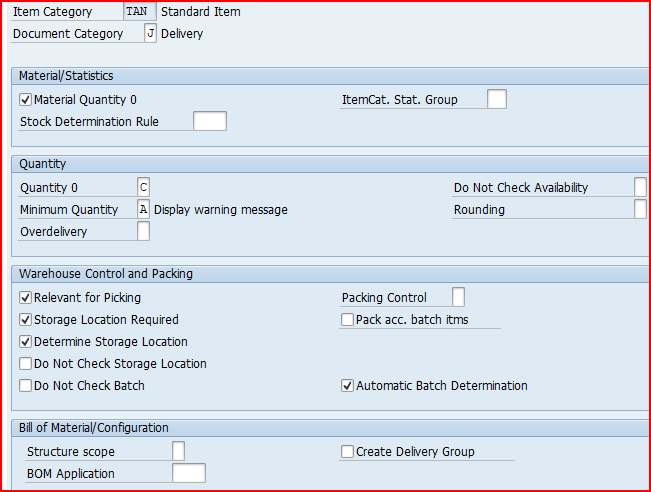
Let’s take the example of Standard Delivery Item category “TAN” & review all the fields which can be configured

Below Delivery Item categories are created for our business
Follow the below path

We use “TAN” for this

--> Stock Transport Order (STO) with Delivery is a SAP process to transfer the stock between two plants (or storage locations) within a company
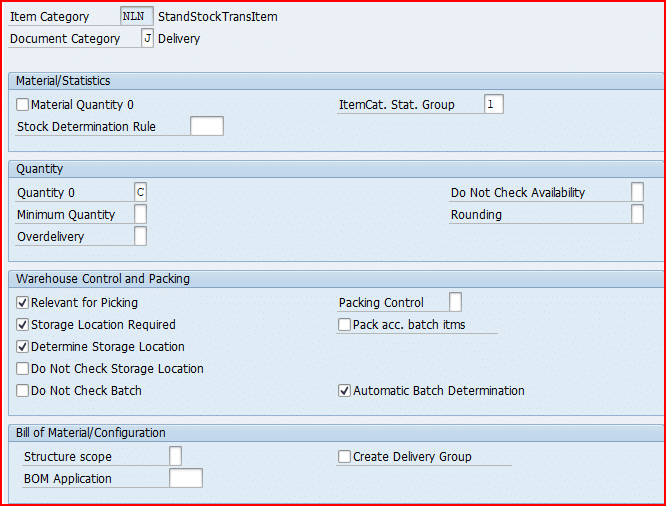
Item category “NLN” is used for the two step Stock Transfer Order with Delivery
Configure item category “NLN” as given in the below screenshot

Please check below post for Stock Transport Order (STO) with Delivery to see item category “NLN” usage
SAP Stock Transport Order with Delivery: A Complete Guide
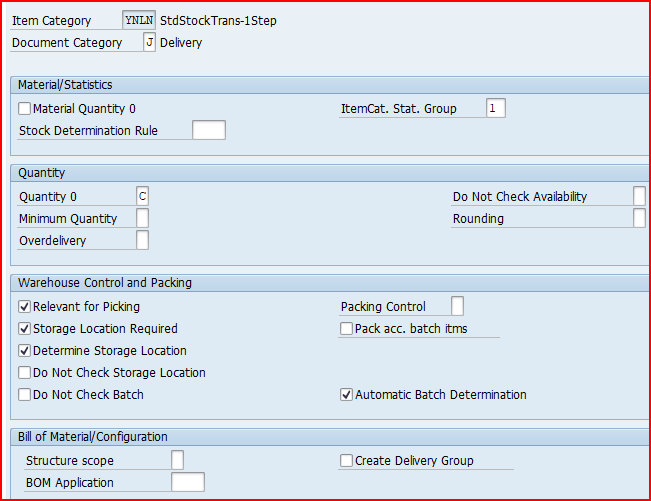
Item category “YNLN” is used for the 1-step Stock Transfer Order with Delivery
Configure item category “YNLN” as given in the below screenshot

Please check below post for 1-Step Stock Transport Order (STO) with Delivery to see item category “YNLN” usage
SAP Stock Transport Order
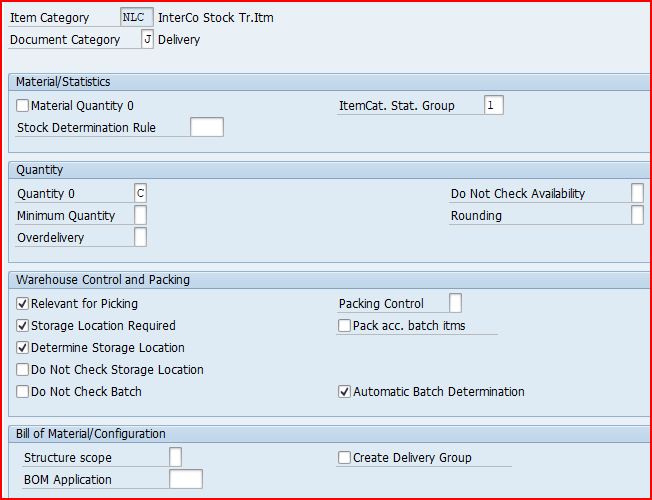
Item category “NLC” is used for the the Inter-company STO Process with Delivery & Billing.
Configure item category “NLC” as given in the below screenshot

Please note that item category for inbound delivery needs to be maintained as a sales item category also, though item category will never have a sales order reference.
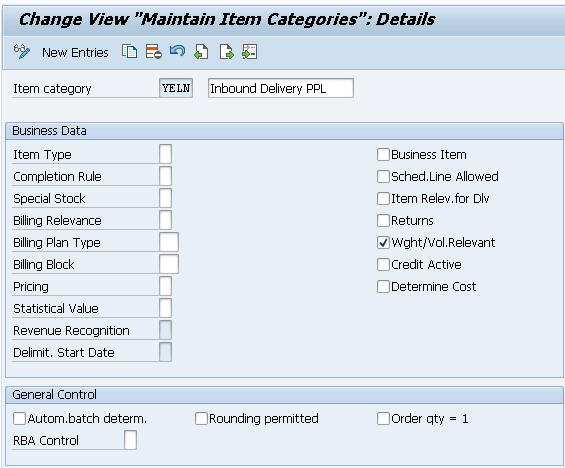
For our car business inbound delivery, we will configure item category as “YELN”. We will define same item category key as “YELN” as a sales document item category also.
The reason for this is given below
--> Delivery item category key must be the same key as order item category. --> So we must define all delivery item categories as sales item categories in Sales and Distribution even for inbound delivery item category which is never found in sales documents. --> This is required for the system to create a copying relationship between the order and delivery document at the item level. For example DL/YELN to YEL/YELN.
Standard inbound delivery items which will follow standard inbound process we will configure item category as YELN.
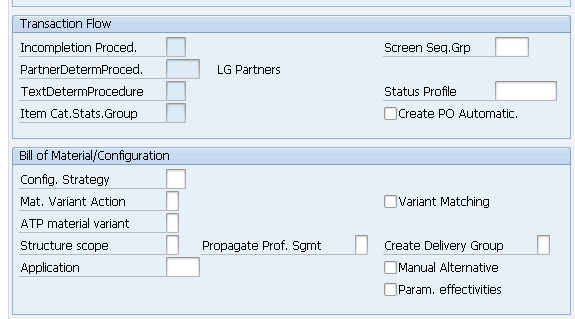
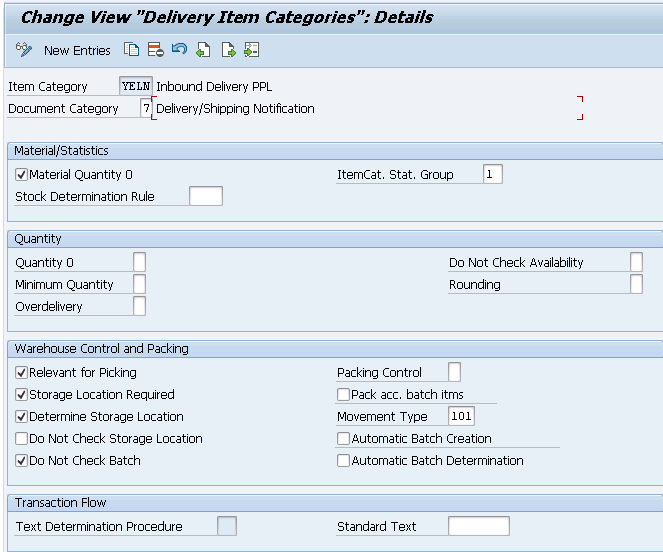
Below is the configuration of all fields for standard item category YELN


Picture : Configuring Inbound Delivery Item category as sales document item category also Screen 2
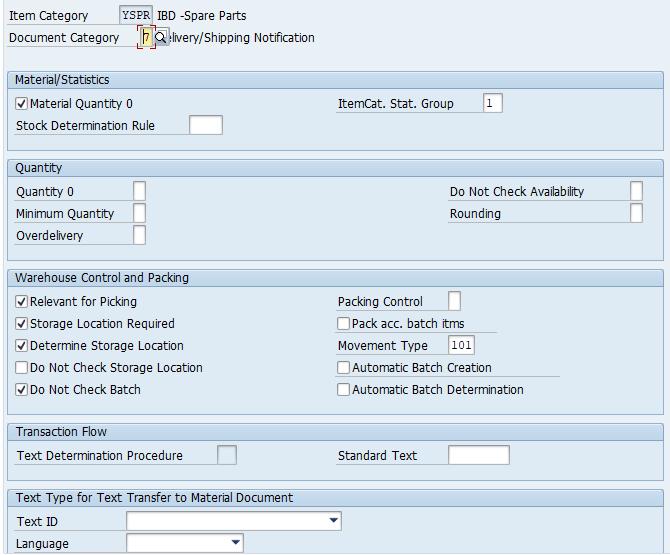
We have configured a special line item category for spares materials which will follow a special business process compare to the standard materials.
below is the configuration of YSPR line item category

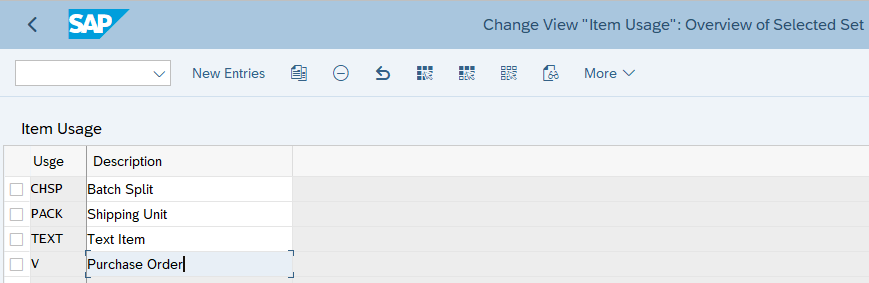
In this configuration, we specify the item category usages that control the usage of the item


There are two ways of item category determination in deliveries
Please note that in material master there are two fields. One is "General Item Category Group" which is at MARA level. This field is used for inbound deliveries The other field "Item Category Group" is used with sales organization & distribution channel in deliveries.
We will configure item category determination for normal customer outbound delivery, intra-company STOs outbound deliveries, intercompany STOs outbound deliveries & inbound deliveries.
below is the path to determine item categories in deliveries.

Item category is determined based on the below
We will configure Determination of Item Categories in Outbound Deliveries one by one for all the scenarios
For our car business, we have configure determination of Item Categories in Outbound Deliveries as below
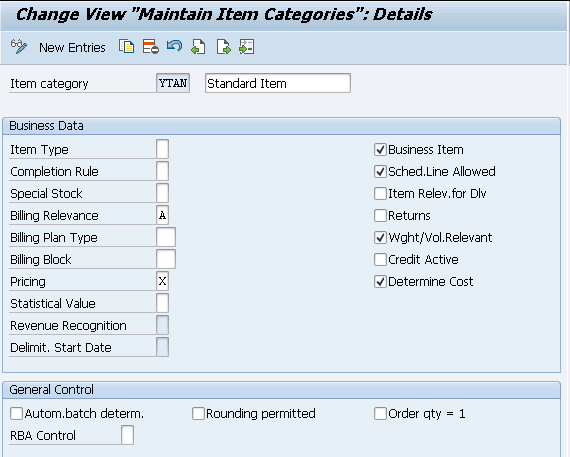
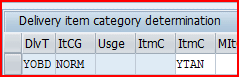
For standard delivery type “YOBD” & Item Category “YTAN” is used
We have configured Item Category Determination for Standard Outbound Delivery as per below screenshot

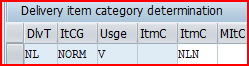
for Two Step Stock Transfer Order with Delivery, Item category “NLN” & delivery type “NL” is used.
We have configured Item Category Determination for Two Step Stock Transfer Order with Delivery as per below screenshot.

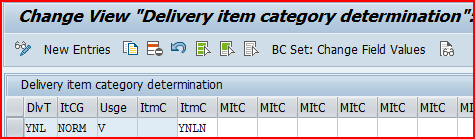
for 1-Step Stock Transfer Order with Delivery, Item category “YNLN” & delivery type “YNL” is used.
We have configured Item Category Determination for 1-Step Stock Transfer Order with Delivery as per below screenshot.

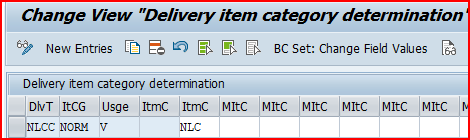
for Inter-company STO Process with Delivery & Billing, Item category “NLC” & delivery type “NLCC” is used.
We have configured Item Category Determination for Inter-company STO Process with Delivery & Billing as per below screenshot.

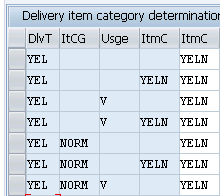
We will configure the determination of Item Categories in Inbound Deliveries for all the business scenario
Below is the configuration of Item Category Determination in Standard Inbound Delivery

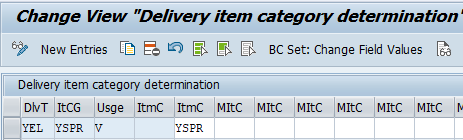
Spare parts materials will follow a different process in inbound so we have configured a specific line item category YSPR for spare parts.
Below is the configuration of Item Category Determination in Special Process Inbound Delivery for spares

--> In the above item category determination different is the only Item category which comes from the material master. --> To determine different line item category "YSPR" for the spare parts materials from the the standard line item category "YELN", we have to input different "item category" in the material master of spare parts materials. Please check the below link to see this in detail 2 Minutes Guide to Create your First Material in S4 HANA-“Gen. item cat. grp” for Spare Parts Specific Business Purpose
The post Mastering SAP Sales Item Categories: A Comprehensive Guide appeared first on Ultimate SAP Guides | S4 HANA Logistics Modules.